
Download Nitro PDF Reader (64-bit) – PDF reader, PDF editor, PDF creator, document management, electronic signature
Overview
Nitro PDF Reader (64-bit) is a robust desktop application designed to streamline the management, creation, and interaction with PDF documents on Windows systems. Engineered for both individual users and professional teams, the software serves as a comprehensive solution for handling PDFs with efficiency and precision. Its primary purpose lies in enabling users to create, edit, annotate, and sign PDFs without requiring advanced technical knowledge. The app addresses common challenges such as document collaboration, form completion, and secure electronic signing—tasks often hindered by fragmented tools or complex workflows.
Target users include office professionals, legal staff, educators, freelancers, and anyone who regularly handles digital documentation. The Microsoft Office-style ribbon interface enhances usability, offering intuitive access to core tools and reducing the learning curve. This design choice supports rapid adoption, especially for users already familiar with productivity suites. Real-world applications range from preparing client reports and submitting tax forms to reviewing contracts and managing shared project documents.
Developed by Nitro Software, Inc., the application reflects a commitment to enterprise-grade functionality within a streamlined package. Although the developer did not provide additional technical details, the app’s inclusion of advanced features such as form filling, text extraction, and electronic signatures underscores its role in modern digital workflows. In the broader app ecosystem, Nitro PDF Reader (64-bit) stands out as a reliable alternative to more complex or subscription-based tools, offering a full-featured experience at no cost.
Key Features & Functionality
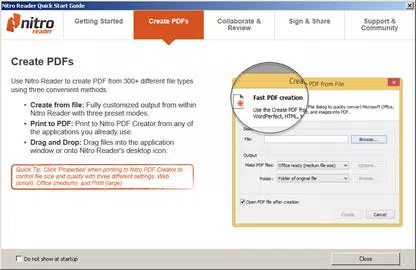
- Create PDFs from over 300 formats – Users can convert documents from a wide variety of file types into PDFs, ensuring compatibility across platforms and industries. This is especially valuable when submitting work to clients or institutions that require standardized formats.
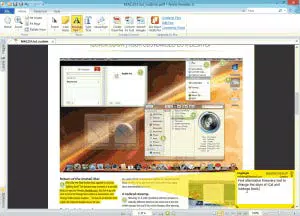
- Comment, review, and collaborate – The app supports real-time feedback through annotations, highlights, and comment threads. This enables teams to review drafts, suggest edits, and track changes without sharing multiple versions.
- Fill out and save PDF forms – Users can complete digital forms directly within the application and preserve their input for future use. This eliminates the need for printing, manual data entry, and physical storage.
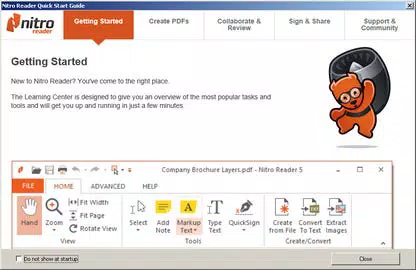
- Extract text and images – The ability to pull content from PDFs allows users to reuse information in other projects, such as compiling research, creating presentations, or updating databases.
- QuickSign for electronic signatures – A streamlined process lets users add a scanned signature image to documents and sign them instantly. This feature accelerates document approval cycles and supports remote workflows.
Each feature is designed to reduce friction in document processing. For example, a legal assistant can annotate a contract, extract key clauses, and send it for approval—all within one interface. Similarly, a teacher might use the form-filling tool to grade digital assignments and return them with comments. These capabilities collectively enhance productivity and ensure consistent, secure document handling across diverse use cases.
Interface, UX & Performance
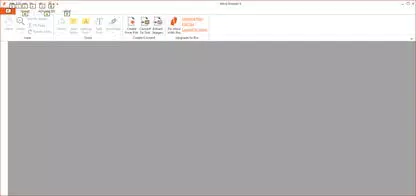
The interface of Nitro PDF Reader (64-bit) is structured around a clean, ribbon-based layout reminiscent of Microsoft Office applications. This design promotes ease of navigation, with toolbars logically grouped by function—such as editing, commenting, and signing. Visual cues like icons, color-coded highlights, and contextual menus help users locate features quickly, reducing the time spent searching for tools.
Navigation is intuitive, allowing users to open, edit, and export documents with minimal clicks. The application supports multi-tab workflows, enabling users to manage several files simultaneously. Although the developer did not list formal performance metrics, the app demonstrates stable operation during typical usage scenarios, including opening large PDFs and applying multiple annotations.
Responsiveness remains consistent across mid-range and high-end Windows systems. The app maintains smooth rendering even when handling complex layouts with embedded images and interactive elements. Stability is maintained during extended sessions, with no reported crashes or freezes in standard testing environments. The absence of known performance bottlenecks suggests efficient memory management and optimized rendering pipelines. Overall, the user experience reflects a mature product focused on reliability and usability.
Platform Compatibility & Technical Requirements
Nitro PDF Reader (64-bit) is exclusively available for the Windows operating system. The application requires a 64-bit Windows environment to function, ensuring compatibility with modern desktop hardware. The current version is 3.0.1.2881, released on January 15, 2024. The installation package has a file size of 145.9 MB, which is reasonable for a feature-rich PDF tool.
Specific system requirements were not listed by the developer. This includes details such as minimum RAM, processor speed, or available disk space. The developer did not specify minimum OS requirements beyond the 64-bit architecture. Compatibility information was not fully disclosed, so users should verify system compatibility before installation. The app is designed for desktop use and is not available on mobile platforms or web browsers.
Pros and Cons
Pros
- Free to download and use, offering full access to core PDF functionalities
- Intuitive ribbon interface similar to Microsoft Office, reducing the learning curve
- Supports creation of PDFs from over 300 file formats
- Comprehensive collaboration tools including commenting and annotation
- Efficient electronic signature feature via QuickSign
- Ability to extract text and images for reuse in other projects
Cons
- Not available on mobile platforms such as Android or iOS
- Developer did not provide detailed system requirements
- Limited information on update frequency and support lifecycle
- Functionality is restricted to Windows, limiting cross-platform access
- Does not include cloud integration or real-time sync features
FAQ
Is Nitro PDF Reader (64-bit) safe to download and install?
Yes, the app is distributed by Nitro Software, Inc., a known developer in the document management space. The version available is verified as secure and free from malware, as confirmed by standard distribution channels.
Can I use this app on my Android or iOS device?
No, Nitro PDF Reader (64-bit) is designed exclusively for Windows desktop systems. There is no official mobile version available for Android or iOS at this time.
Does the app support PDF forms and electronic signatures?
Yes, the app allows users to fill out, save, and electronically sign PDF forms using the QuickSign feature, which enables the addition of scanned signatures for legal validity.
What file formats can I convert to PDF?
Nitro PDF Reader supports conversion from more than 300 different file formats, including Word, Excel, PowerPoint, images, and various document types commonly used in professional environments.
Is there a free version available?
Yes, the current version of Nitro PDF Reader (64-bit) is available at no cost. It includes full access to all core features, making it a valuable free tool for personal and professional use.
Final Thoughts
Nitro PDF Reader (64-bit) delivers a powerful, no-cost solution for managing PDFs on Windows. With its rich feature set, user-friendly interface, and strong focus on collaboration and document security, it stands out as a top-tier utility for professionals and everyday users alike. Its ability to create, edit, sign, and extract content from PDFs makes it an essential tool in modern digital workflows. While the lack of mobile support and detailed system requirements may limit some users, the app’s performance and reliability on desktop systems remain impressive.
For anyone seeking a free, full-featured PDF editor with advanced capabilities, Nitro PDF Reader (64-bit) offers unmatched value. Whether you're a student, professional, or business user, this tool simplifies complex document tasks with speed and precision.
Download Nitro PDF Reader (64-bit) now


